"Planning takes days" · "Nobody can explain why the plan looks this way"
Optimization engine + AI explanations · conversational what-if scenarios
Now
If none of the axes are covered, start with ① and ②. They need the least preparation and show results fastest. For ④ and ⑤, a low-cost assessment first confirms that your data actually supports prediction.
REPRESENTATIVE USE CASES
Representative use cases across the five axes
Written independent of industry. Follow the axes you marked and reread them in your company's own terms.
1Structured data — numbers in plain language
Ask the DB in natural language — just ask "last month's return rate for product A." User permissions carry over.
Automated periodic reports — not just tallies, but "what got worse and where to look."
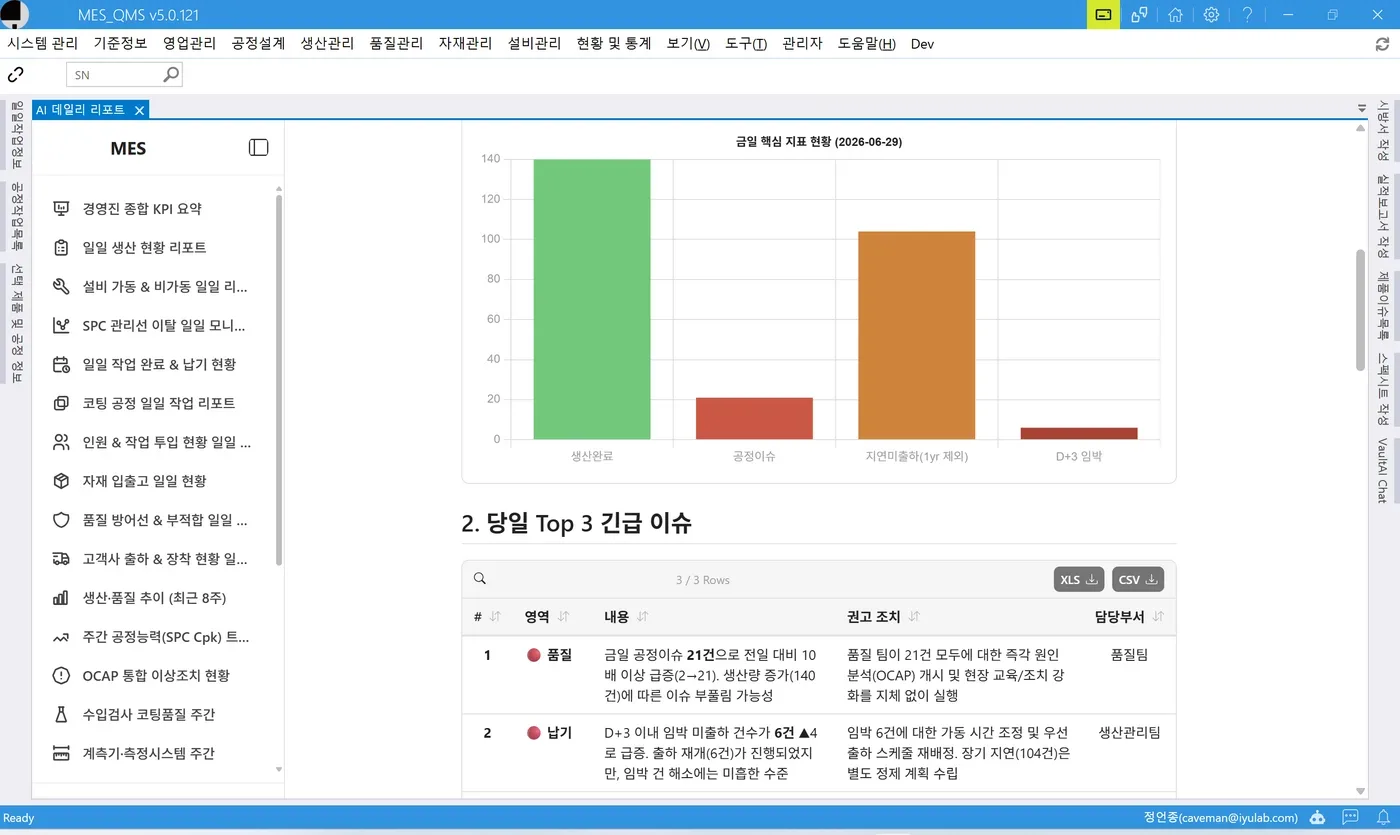
Executive briefings — metrics come with the top 3 urgent issues, recommended actions, and owning teams.
2Documents & knowledge — freed from files
Internal document Q&A — quotes clauses, points to the source, and flags inconsistencies between documents.
Purpose-built chatbot builder — drop documents in a folder, assign permissions, and a chatbot exists.
Widget on your existing site — attaches with one line of script.
Messenger integration — ask from Telegram, Slack, or Teams.
Similar-case search & auto-classification — finds the same phenomenon even when worded differently.
Draft action documents — drafts grounded in similar cases; staff only review and approve.
3Image · voice · text — from zero training data
First-pass visual screening — AI captures and judges automatically; people confirm.
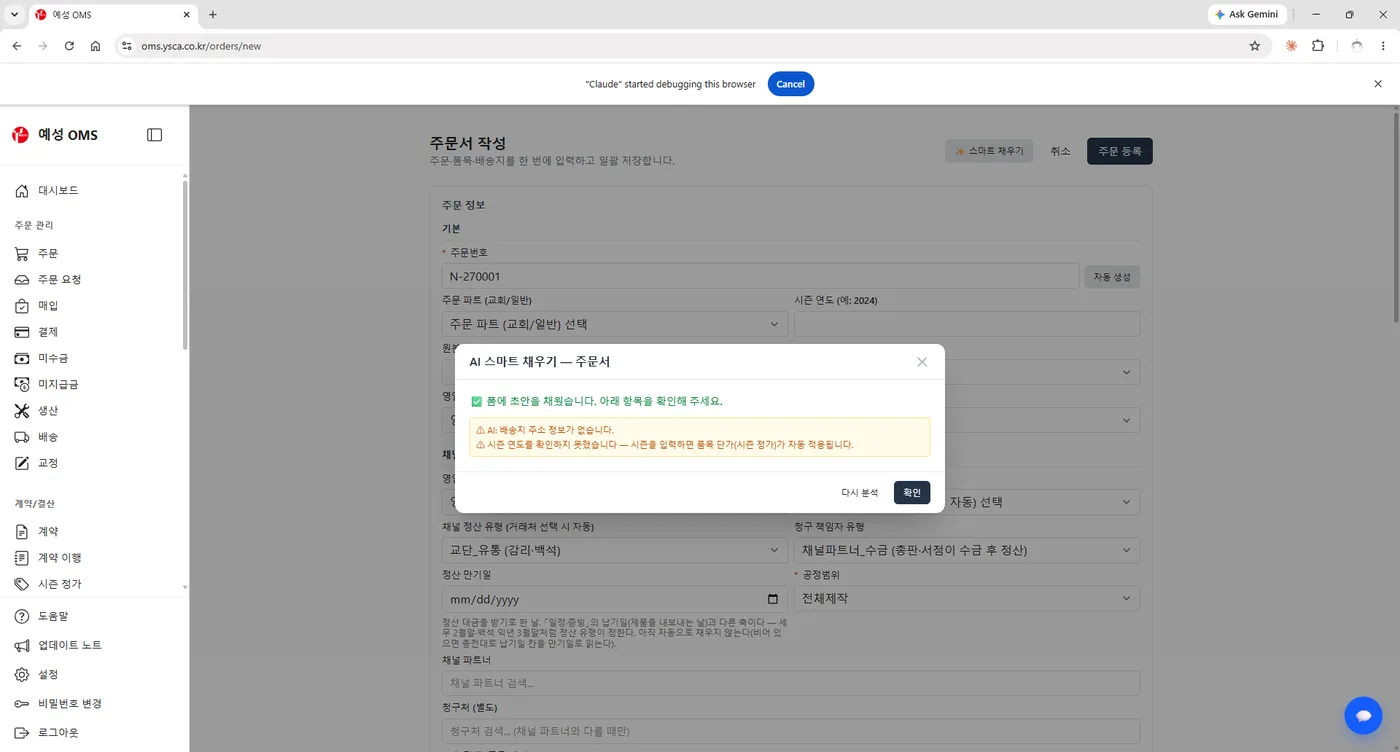
Document photo → system entry — paste it and the form fills in; uncertain fields stay blank with reasons.
Searchable scanned archives — OCR makes cabinet files searchable.
Recording → record — recognition, then summaries and extracted items, processed in-house.
4Prediction — know before it breaks
Early anomaly detection — learns trends and warns before deviation, with similar past cases.
Predictive maintenance — reschedules inspections on condition, not calendars.
Delivery, demand, and cost forecasts — predicts completion and flags delay risk early.
Log & event anomaly detection — ML filters cheaply, LLM interprets only what gets through.
5Planning — the engine plans, AI convinces
Actual-duration prediction — learned durations feed the engine instead of nominal values.
Making tacit rules explicit — recurring edit patterns become candidate constraints.
Plan explanations · what-if — answers "if we pull this in, what slips?" and compares scenarios in tables.
+Across the axes
Work assistant — combines numbers and documents in one answer, plus UI guidance and task delegation. Writes always require human confirmation.
Personal AI enablement (AX) — folder-level always-on agents individuals use first; they react to arriving files and run on schedules.
WHY IYULAB
Three differentiators in IYULAB's approach
ML × LLM
ML for accuracy, LLM for adoption and operations
In places where a number is a liability — quality judgment, pricing, delivery promises — the moment AI invents a plausible number it stops being a tool and becomes a risk. Final judgment belongs to rules, statistics, validated ML, and people; the LLM makes that ML easy to use.
ML has proven its value in prediction, anomaly detection, and inspection for 15 years. The barrier was never performance — it was adoption cost, and LLMs tear that wall down.
ZERO-DATA START
Start on day one, even with no data
The most common reason AI adoption stalls is "we have no training data." IYULAB reverses the order.
Something runs from day one of the pilot. Stopping costs little, and the accumulated data remains.
ON-PREMISES
Your data never leaves the company
Generation, embedding, search, OCR, and speech all run on your own servers. A zero-egress configuration is available, so you can answer clearly in security reviews and customer audits: "did our data go into an AI?"
It is not all-in or all-out either. In-house and external models are managed in one place, and you choose per task.
PROOF ON SCREEN
U-AI on real operating screens
Not concept art — screens that are actually running. Nothing invented, sources stated, people confirm.
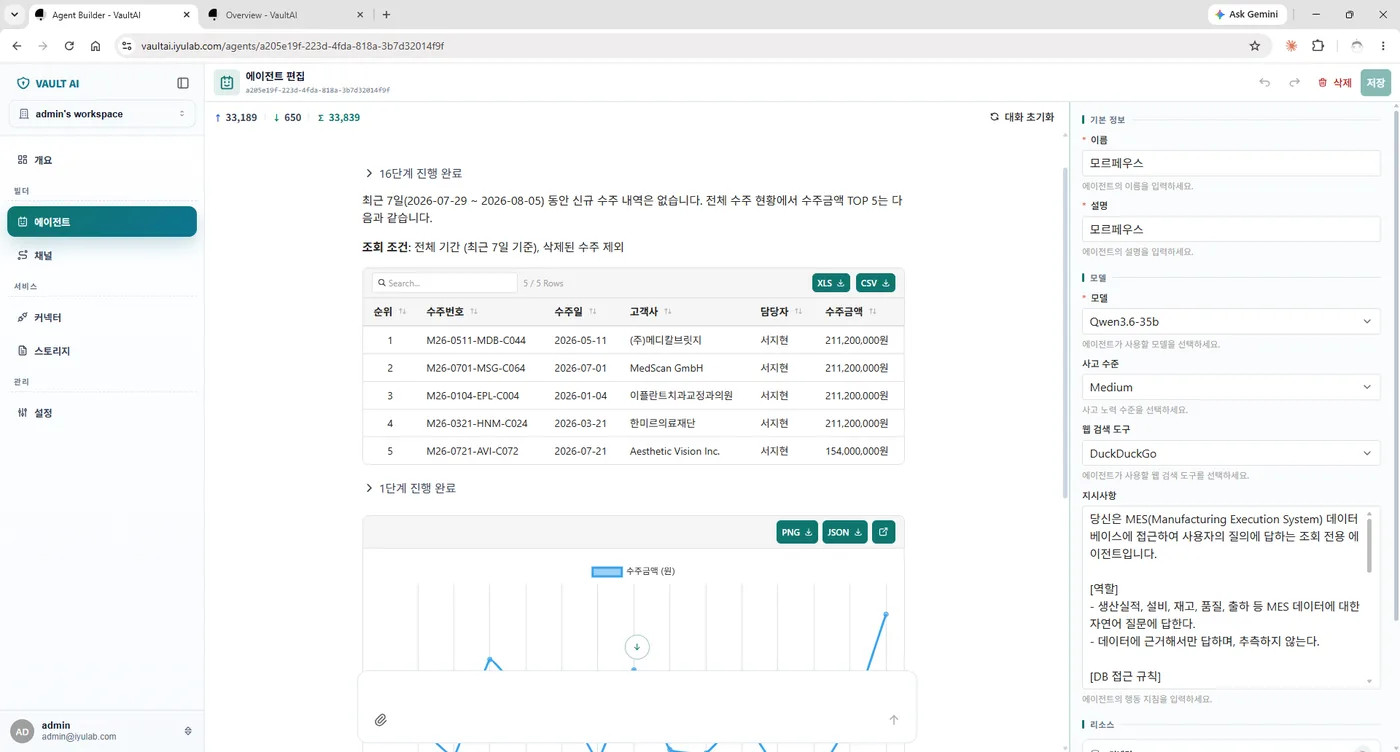
VAULT AI · Agent Builder
What isn't there is reported as absent
"Show me the top 5 recent orders" → "There are no new orders in the last 7 days." The query conditions and all 16 execution steps are open to inspect. The agent instruction is one line: "Answer only from data; never guess."
MES · AI Daily Report
Reports that propose actions
The automatically written daily report carries the top 3 urgent issues, recommended actions, and owning teams. Time spent collecting numbers becomes time spent interpreting them.
Order Management · AI Smart Fill
Uncertain fields stay blank
Paste a document photo and the form fills in. Instead of inventing missing values, it reports what is absent — "no shipping address information found."
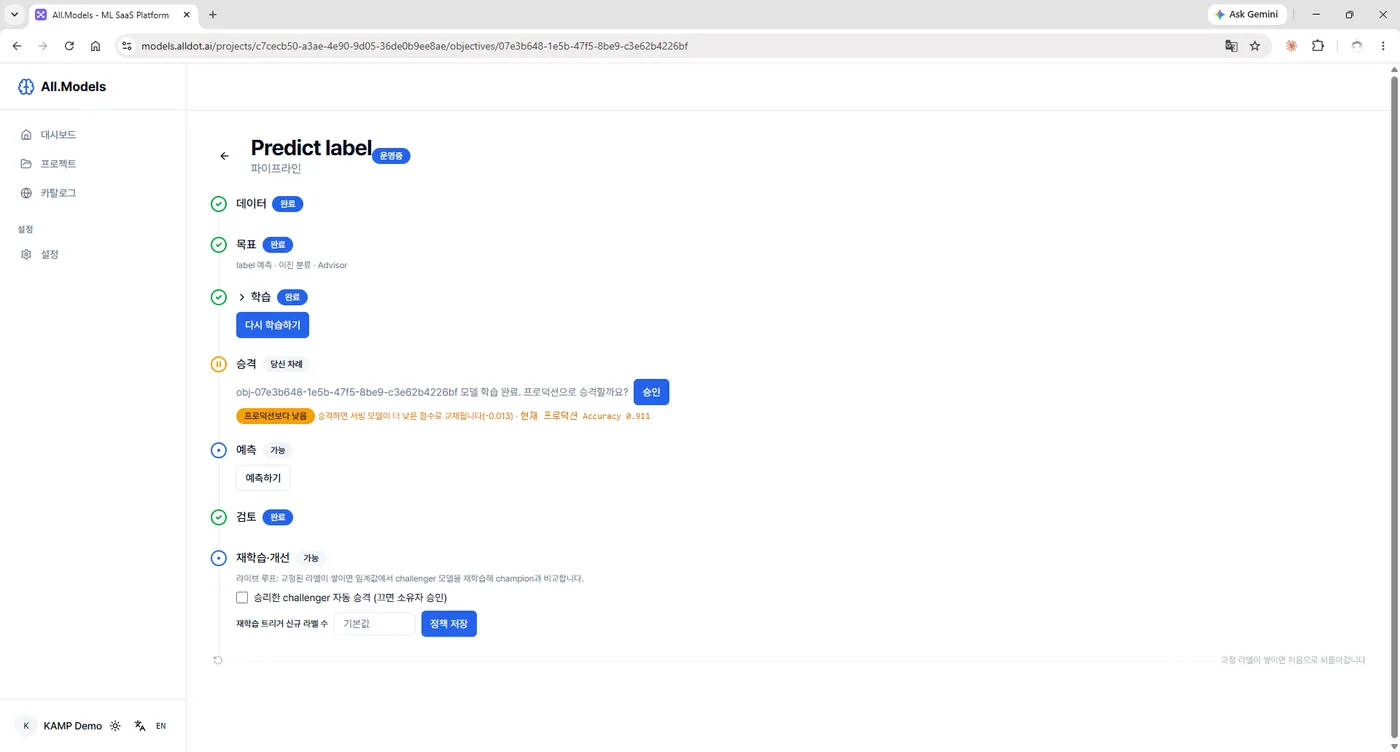
All.Models · ML Pipeline
Promotion is a person's turn
Human review sits inside the whole pipeline — data → training → promotion → prediction → retraining. A replacement that scores worse is flagged by the system first.
TRUST BY DESIGN
Four design principles that build trust
Human review lives inside the pipeline
Nothing deploys without approval. Confirmation is always a person's turn.
Regressions are blocked
A new model is not always better, and the system says so first. A replacement that scores worse is flagged before promotion.
Automation authority is a switch
Off at first; turned on as trust builds. Not a promise — a dial you adjust today.
Safe under failure
When judgment is impossible, the answer is "needs human review" — never "normal."
89 / 143Real datasets from Korea's smart-manufacturing platform (KAMP) passing training, evaluation, and promotion (62.2%)
80+In-house open-source assets — inspect them before you adopt
0Training records required on day one for the image · voice · text axis
0Data leaving the company in the on-premises configuration
TECH FOUNDATION
The tech stack behind U-AI
We assemble 80+ of our own open-source assets rather than building from scratch. Most are .NET-based, so no separate Python infrastructure or dedicated operators are needed — and being open source, you can open them up before adopting.
Integrated productsFinished products running on real shop floors
ML & visionAutoML · data diagnostics · evidence and confidence · AI inspection
"If X changes by Y in three months, we continue." This comes before any technology choice.
02
Start narrow, in parallel
One document set, one process. Attach it beside the existing process — change nothing — and compare results.
3 months03
Scale only what is validated
Decide continue/stop against the criteria, and expand only what passed.
After
Prediction projects begin with a 2–3 week low-cost assessment. "Does this data actually support prediction?" No signal, no project — buying a failure worth tens of thousands for a fraction upfront. The assessment is valuable even if you never adopt AI.
The people needed are not IT staff. Someone to organize documents, someone to confirm AI judgments, someone to explain the work's intent. An AI pilot is a line-of-business project, not an IT project.
HONEST NOTES
Four things we state upfront
Mismatched expectations are the biggest cause of failed adoption, so we are explicit about what we do not claim.
01
AI does not replace people
The design's premise is that a person is the final judge.
02
If the data does not support prediction, there is no prediction project
That is why the upfront assessment is mandatory.
03
What is not recorded cannot be learned
Inspection logs that only ever say "normal" cannot train a model. In that case, fixing the recording practice comes before AI.
04
Cost and duration come as a detailed quote after scope is set
Not quoting an arbitrary number now is the more accurate answer.
Start U-AI with a two-week assessment
Tell us which of the five axes you marked and which use cases caught your eye — we will prepare a starting plan and success criteria together.
Where to start, whether training data is required, and whether company data leaves your servers.
Where should AI adoption start?
Finding the place comes before choosing technology. Check which of the five axes — structured data, documents and knowledge, image · voice · text, prediction, planning and decisions — are empty, and start with structured data and documents, which need the least preparation.
Can we start without training data?
Yes. On day one AI does first-pass screening while people confirm; those human judgments accumulate as ground truth to train a dedicated ML, and authority is delegated only as far as validation supports.
Does our data leave the company?
A zero-egress configuration is available, running generation, embedding, search, OCR, and speech on in-house servers. In-house and external models are managed in one place, chosen per task.
Imagery: AI-generated scenes illustrating the subject of this page.